Free and open source
Stream your game. Talk with your group.
Streaming and voice in one place, built for playing together: low delay, noise suppression and rooms just for your group, where everyone can stream at the same time.
Windows 10 and 11, 64-bit
Open the downloaded file. If Windows shows “Windows protected your PC”, click More info and then Run anyway.
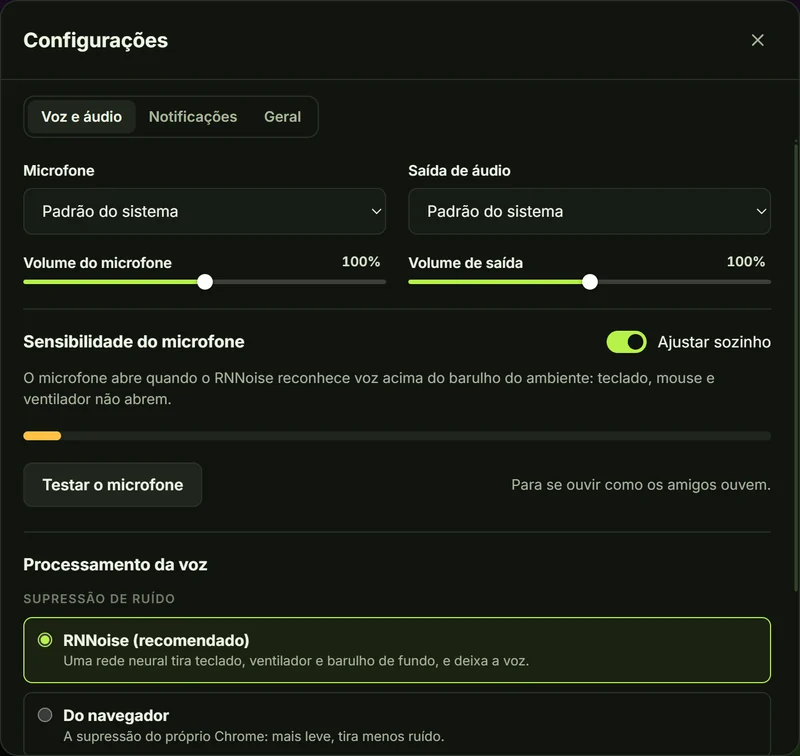
Voice that stays out of your game's way
Join the room and you're already in the conversation. Your mic only opens when you speak, and the background noise stays in your room.
- Smart noise suppression
- Very low delay
- All in one app
-
Only your voice gets through
Keyboard, mouse and fan noise stay out: noise suppression lets only your voice through.
-
Automatic sensitivity
Your mic opens when it recognizes a voice above the room noise. Prefer to tune it? Drag the threshold over the level meter, or use push-to-talk (a key or a side mouse button).
-
Every friend at the right volume
Mute and deafen in one click, or with a shortcut that works with the game in front (Ctrl+Shift+M and Ctrl+Shift+D). Each friend's volume up to 200%, "mute for me", and your choice of microphone and audio output.
-
Fast and light
Conversation with very little delay that barely uses your connection.
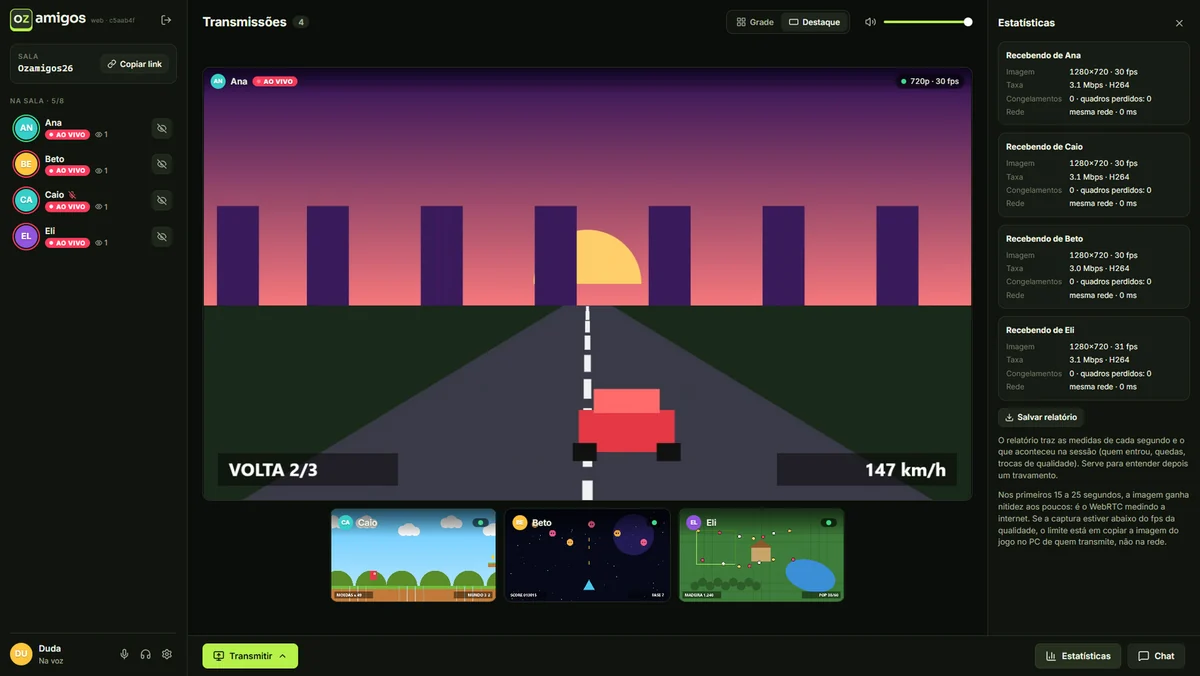
Made for playing together
Everything your group needs to watch each other's matches, without the hassle.
-
Smooth, no stutter
Low delay for viewers, and the picture adapts to each person's connection without freezing.
-
Everyone streams at once
Rooms of up to 8 people. Watch one or several streams, in a grid or with one in focus.
-
Game audio without echo
The app streams your PC audio without your friends' voices or the streams you're watching: nobody hears themselves back.
-
Floating window
Pop a stream out into a small window that stays on top of your game.
-
Room chat
Messages, images (paste a screenshot with Ctrl+V, or grab one from a friend's stream in one click) and video links with previews, in a side panel. Nothing is stored: whoever joins later doesn't see what was said before.
-
Watch from your phone
In your phone's browser, you can watch the streams and join the conversation, without installing anything.
-
Just for your group
Rooms protected by the group password, and your stream only reaches those who click Assistir (watch).
-
In the tray, out of the way
Close the window and the conversation goes on, with the app by the clock. Windows notifications only show up while your game is in front, and each kind can be turned on or off.
-
Always up to date
The app updates itself when it opens and rejoins the room if your connection drops.
App or browser?
Both join the same rooms and talk together. The Windows app does what the browser can't: it sends the game audio without your friends' voices mixed in.
| Feature | Windows app | Browser |
|---|---|---|
| Watch and stream | ||
| Voice with noise suppression | ||
| Several streams at the same time | ||
| Game audio without echo | ||
| Window picker with thumbnails | ||
| No stutter with the game in front | ||
| Works without installing anything |
How it works
-
Install the app
Download the installer and open it. From then on, it updates itself.
-
Join with the group password
Pick the name your friends know you by and use the password from whoever invited you.
-
Call your friends and play
Copy the room link and send it to the group. Whoever joins is already in the conversation; to show your game, click Transmitir (Stream).

Privacy
Your conversations are yours: no sign-up, no ads, and nothing that's said is stored. Read the privacy policy.
- No sign-up
- No ads
- Encrypted conversations
-
On your device
Your name, the group password and your preferences are stored in your browser or in the app.
-
Conversations that aren't stored
Voice, streams, messages and images are encrypted and never stored: whoever joins later doesn't see what was said before. Your stream only reaches those who click Assistir (watch).
-
Statistics to improve the app
When Ozamigos uses technical performance statistics, such as connection quality, to improve streams and voice, the app lets you know. The content of your conversations is never part of them.
Rooms are for people you know: anyone in the same room can see your IP address. The code is open: check it on GitHub.
FAQ
Didn't find your answer? Ask on GitHub.
Is the app in English?
Not yet: the app interface is in Brazilian Portuguese. It's simple to use, and the main buttons are Entrar na sala (join the room), Transmitir (stream) and Assistir (watch). The microphone, headphones and gear icons work just like in any voice chat.
Windows said it protected my PC. Is it safe?
The warning appears for apps Windows doesn't know well yet. Click More info and then Run anyway. The code is open, and every version is built automatically from it.
Do I need a password?
Yes, the group password. Ask whoever invited you: it keeps strangers out of the rooms.
Is it free?
Yes. Ozamigos is free and open source, under the MIT license.
Can I use it without installing?
Yes. The portable version opens with a double click and is on the downloads page. Or use it in the browser (Chrome or Edge), voice included. Only the game audio goes without the separation the app does.
Do I need another app to talk?
No. Voice is built into Ozamigos: whoever joins the room is already in the conversation, with noise suppression, mute, per-friend volume and your choice of microphone and audio output.
Is there voice delay?
Very little: the conversation flows like a call, even with your game running.
Does it work on Mac, Linux or phones?
The app is Windows 10 and 11 only. On Mac and Linux, use it in Chrome or Edge, with everything except game audio kept apart from voice. On phones, in the browser, you can watch and talk; streaming is computer-only.
Who can see my stream?
Only people in the room who click Assistir (watch). While nobody is watching, nothing from your stream leaves your PC. Voice, video and chat are encrypted and never stored.
Ready to play together?
Windows 10 and 11, 64-bit
Open the downloaded file. If Windows shows “Windows protected your PC”, click More info and then Run anyway.